Components
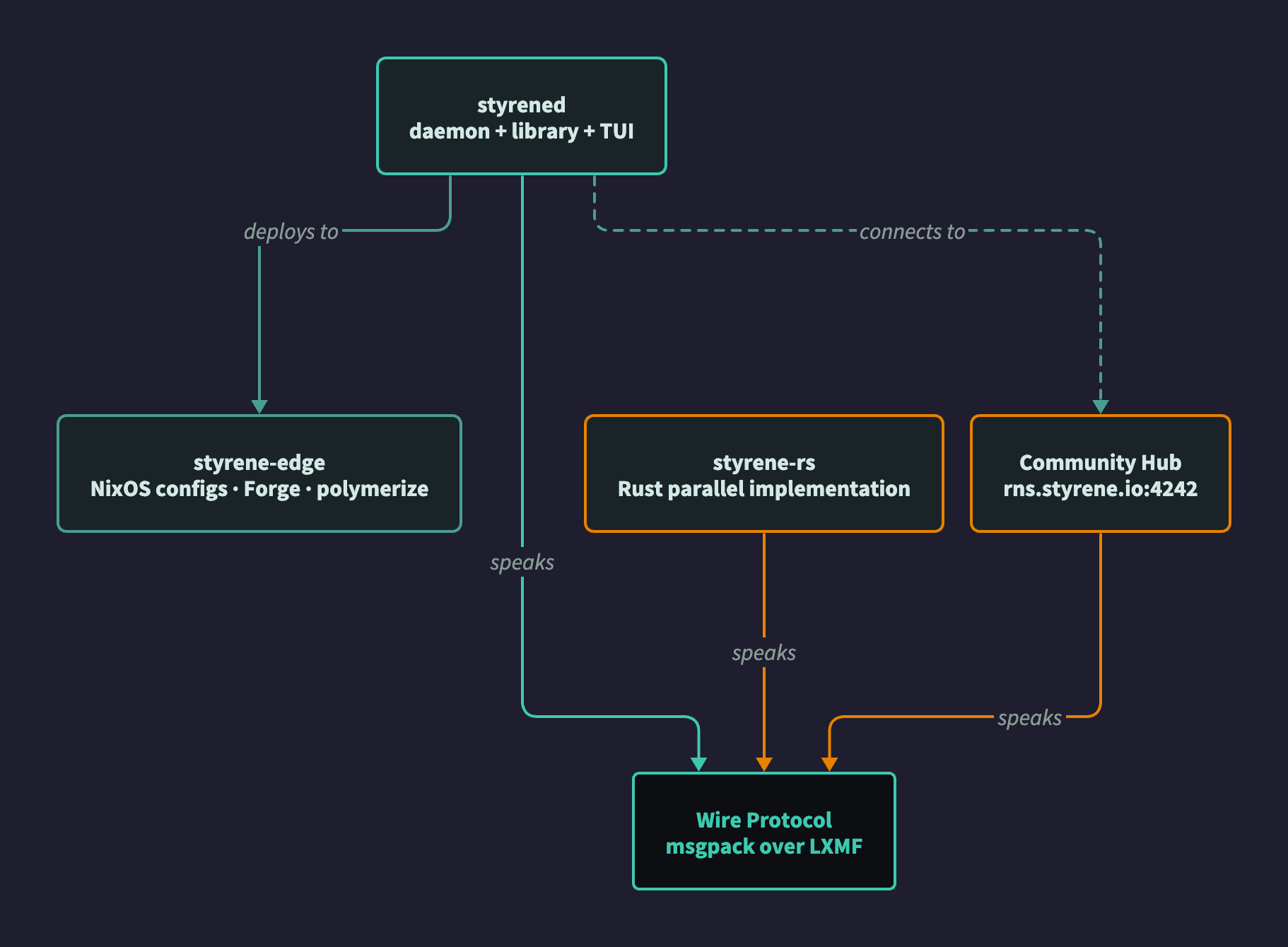
Styrene consists of two main components: styrened (daemon + library + TUI in one package) and infrastructure-as-code for edge devices.
styrened
Unified daemon, shared library, and TUI for the Styrene mesh. The TUI is bundled as a subpackage (styrened.tui), installed via the [tui] extra.
| Status | Alpha |
| Dependencies | RNS, LXMF, PyYAML, SQLAlchemy, msgpack |
| TUI Framework | Textual 8.0 |
| Tests | ~3,844+ (unit, TUI, mesh, bare-metal) |
| Theme | Imperial CRT (green phosphor terminal) |
Installation
pipx install styrene                    # Recommended (daemon + TUI, isolated env)
pip install styrened                    # Daemon + library only (no TUI, for edge devices)
nix run github:styrene-lab/styrened     # Nix flake
Entry Points
| Command | Purpose |
|---|---|
styrene | Launch TUI (styrene --upgrade to self-update) |
styrened | Daemon CLI (headless) |
As Daemon (runs on edge devices)
- RPCServer — fleet management commands
- AutoReplyHandler — responds to NomadNet/MeshChat users
- LXMFService — messaging with optional propagation node mode
- Device Discovery + NodeStore — persistent mesh topology
- TerminalService — remote shell via PTY over RNS Link
- IPC Control Server — Unix socket for local CLI/TUI
- HTTP API — optional REST endpoints
As TUI (operator interface)
The TUI (styrened.tui) is a Textual-based terminal application using the Imperial CRT theme.
Screens:
- Dashboard — Fleet overview with mesh device table, activity feed
- Chat — Encrypted LXMF conversations with delivery tracking
- Device Detail — Mesh node info, actions (Message, Add Contact, Copy Hash)
- Settings — Tabbed: Identity, Network, Fleet, System
- Exploration — Non-Styrene RNS announces
- Upgrade — In-app self-update with live progress
- First-Run Wizard — Initial setup and daemon connection
Network Settings (7 panels):
- STYRENE COMMUNITY HUB — Single toggle (default ON), controls both transport peer and LXMF propagation destination
- TRANSPORT — Mode, transport toggle, announce interval
- PEERS — Dynamic add/remove of RNS transport peers
- PROPAGATION — LXMF propagation destination hash (auto-synced with community hub toggle, accepts custom 32-char hex)
- LOCAL DISCOVERY — AutoInterface toggle
- SERVER — Server interface (IP/port)
- BATMAN-ADV MESH — mesh_id, channel, gateway_mode
As Library
- RPC client/server implementations
- Wire protocol v2 encoding/decoding
- Message models and data structures
- Service lifecycle management (LXMFService, ConfigService, NodeStore)
- Device discovery and conversation services
Community Hub Integration
New installs default to the Styrene Community Hub (rns.styrene.io:4242):
- RNS transport peer for announce relay
- LXMF propagation destination for store-and-forward messaging
COMMUNITY_HUB_PROPAGATION_HASHconstant inmodels/config.py- OPERATOR profile defaults set this as
lxmf.propagation_destination
Theme: Imperial CRT
┌─ Imperial CRT Phosphor Palette ──────────────────────────┐
│  Bright:  #39ff14  Active elements, highlights, success  │
│  Medium:  #32cd32  Standard text, borders                │
│  Dim:     #228b22  Secondary text, inactive elements     │
│  Dark:    #1a5c1a  Subtle borders, separators            │
│  Background: #0a0a0a                                     │
└──────────────────────────────────────────────────────────┘
NixOS Integration
{
  imports = [ ../common/styrened.nix ];
  styrene.daemon.enable = true;
}
styrene-edge
Infrastructure-as-code and provisioning toolchain for the hardware fleet.
| Status | Production |
| Format | Nix configurations + Python (Forge) |
Active Devices
| Device | Arch | Boot | Media |
|---|---|---|---|
| MiniGMK (x86-generic) | x86_64 | UEFI 64 | USB installer |
| Q502L (x86-generic) | x86_64 | UEFI 64 | USB installer |
| T100TA | x86_64 | UEFI 32 | USB installer |
| Raspberry Pi 4 | aarch64 | U-Boot | Direct SD |
| Raspberry Pi Zero 2W | aarch64 | U-Boot | Direct SD |
| RG35XX H | aarch64 | U-Boot | Direct SD |
| R36S | aarch64 | U-Boot | Direct SD |
Usage
# Build SD card image for RPi 4 (fetches from Cachix)
nix build ./sbc#packages.aarch64-linux.rpi4-sd

# Launch Forge TUI for USB media preparation
just run

# Run polymerize.sh on target device after booting USB
sudo /iso/styrene/polymerize.sh
Structure
styrene-edge/
├── sbc/
│   ├── flake.nix               # Nix flake for SD card images
│   ├── common/
│   │   ├── base.nix            # styrene.base NixOS module (shared config)
│   │   ├── batman-mesh.nix     # styrene.mesh BATMAN-adv module
│   │   ├── styrened.nix        # styrene.daemon module
│   │   └── cosmic-desktop.nix  # styrene.desktop COSMIC DE module
│   ├── rpi4/configuration.nix
│   ├── rpi-zero2w/configuration.nix
│   ├── x86-generic/
│   │   ├── configuration.nix
│   │   └── polymerize.sh       # NixOS installer for UEFI x86
│   └── t100ta/
│       ├── configuration.nix
│       └── polymerize.sh       # NixOS installer for 32-bit UEFI
├── firmware/                    # Upstream firmware manifests
│   ├── sources.yaml            # Pinned releases (version + sha256)
│   └── fetch.sh                # Download and verify pinned artifacts
├── forge/                      # Styrene Forge (media prep TUI)
│   ├── data/devices.yaml       # Device catalog
│   └── services/
│       ├── media_writer.py     # USB/SD media writer
│       └── bundle_builder.py   # Config bundler
├── installs/                   # Runbook tracking
├── keys/                       # Builder SSH keys (public only in git)
├── mcu/                        # Microcontrollers (RP2040, ESP32, nRF)
└── router/                     # OpenWrt mesh routers
styrene-rs
Rust parallel implementation of the RNS/LXMF stack, forked from FreeTAKTeam/LXMF-rs. Shares the wire protocol contract with Python styrened — no FFI, no shared memory.
| Status | Phase 1 (Fork and Foundation) |
| Repo | styrene-lab/styrene-rs |
| Upstream | FreeTAKTeam/LXMF-rs |
Crate Inventory
| Crate | Purpose |
|---|---|
styrene-rns | RNS protocol core — identity, destinations, links, resources, ratchets |
styrene-rns-transport | Transport interfaces — TCP, UDP, future Serial/KISS |
styrene-lxmf | LXMF messaging — router, propagation, stamps, delivery pipeline |
styrene-mesh | Styrene wire protocol envelope matching styrene_wire.py |
styrene | Meta-crate re-exporting all library crates |
styrened-rs | Daemon binary (skeleton — active development after interop gate) |
interop-test | Cross-implementation test harness with Python-generated fixtures |
Migration Strategy
Python remains primary until Rust passes the interop gate. See rust-migration for the 5-phase plan.
Relationship Diagram
See Also
- Architecture — System design overview
- Getting Started — Installation guide
- Hardware — Supported devices